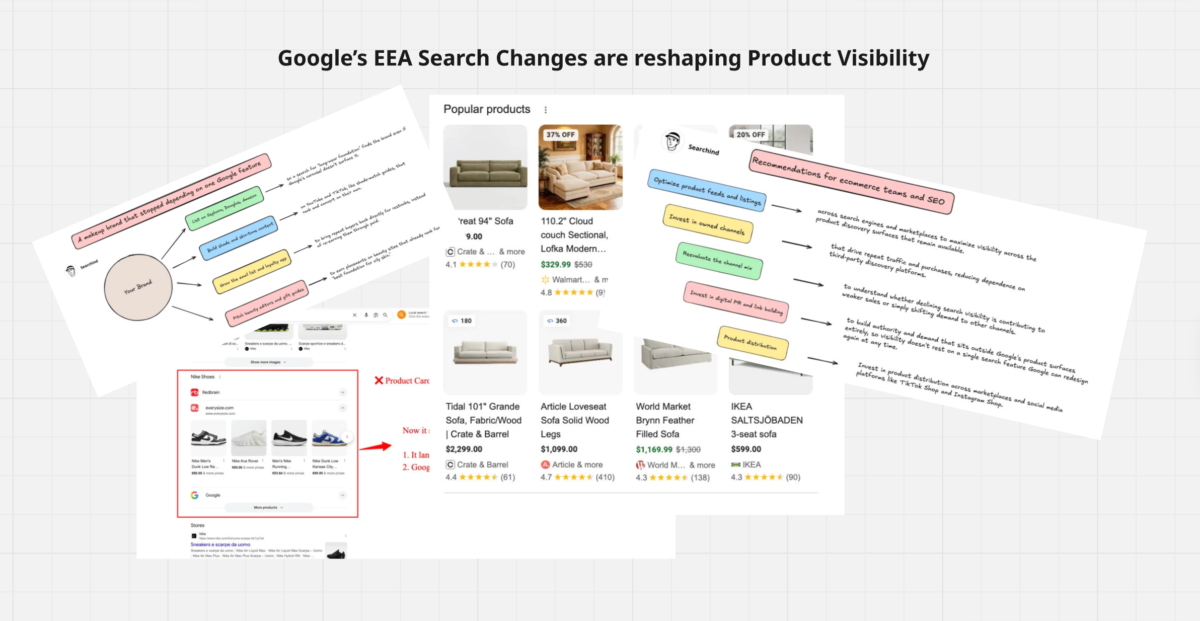
Google’s EEA Search Changes are reshaping Product Visibility
Google just pulled the rug out from under organic Shopping in Europe.
If you sell products online and any share of your traffic comes from Google in the EU, check your Search Console/Google Merchant Center data this week.
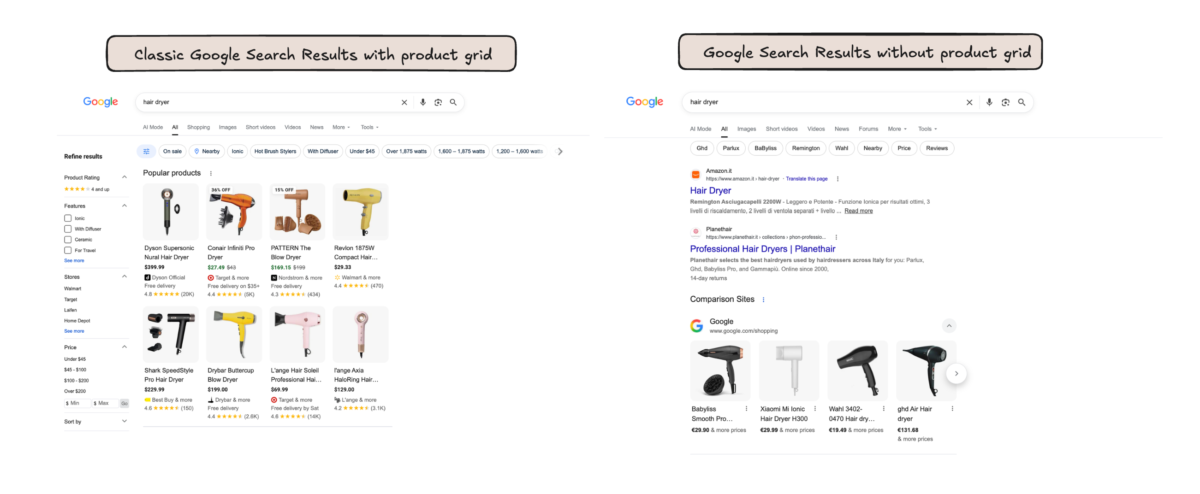
The organic product carousels that used to show up for commercial queries are gone across most of the EEA, replaced by something that looks nothing like the Shopping experience we’ve all optimized for over the past several years.
This isn’t a glitch, and it isn’t A/B testing.
Google rolled out a redesigned search layout for the region on September 8, tied directly to its obligations under the Digital Markets Act.
The company was unusually blunt about it, telling the press that this is the largest quality reduction in Search’s history.
That’s Google’s own framing, not a regulator’s or a competitor’s, which tells you how much leverage the DMA has over how the company is allowed to present its own commerce data in Europe.
What actually replaced the carousel
Where you used to see a horizontal row of products with prices and store names, EEA users now get a stacked list labeled as comparison sites.
Each entry is a collapsed row for a different comparison or aggregator service, with one expanded by default.
Google itself is in that list too, as just one row among several competitors it used to sit above.
The product grid became a list of intermediaries; Google itself is now just one option among the comparison sites, not the default view.
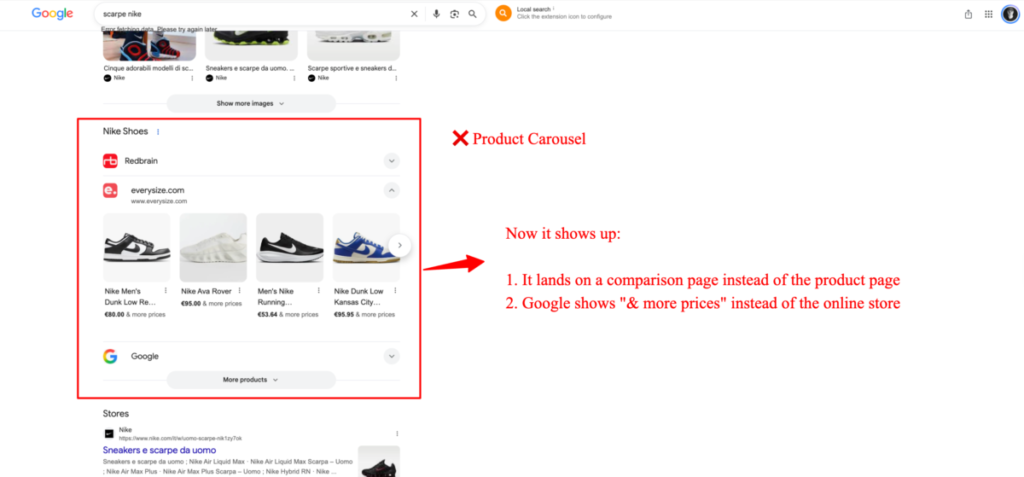
Open Google’s own row and you’ll find something closer to the old carousel, but the click path has changed.
Products no longer show a seller name directly on the card.
You get a price and a prompt for more options, and clicking through takes you to a knowledge panel rather than straight to a retailer.
The underlying product graph is still there; it’s just been pushed a layer deeper and reframed as one option among competitors rather than the default view.
The Shopping tab has also been pulled from the main navigation, though it isn’t dead.
Anyone who knows how to append the right URL parameter can still reach it directly, which tells me this is a presentation change dictated by compliance rather than an actual product decision Google wanted to make.
When a company removes a nav item but leaves the underlying page reachable, that’s usually a sign the change was rushed out to hit a deadline rather than designed from scratch.
Why this is happening now
A fine from the European Commission over self-preferencing forced Google’s hand.
Google got a compliance window with more penalties threatened if it missed it, and the September 8 rollout is that compliance landing all at once rather than easing in gradually as the window closed.
Treat the current layout as a first draft.
The Commission is still watching how Google implements this, and Google has never shipped a search layout without continuing to adjust it, so expect the EEA experience to keep shifting, tightening or loosening depending on how the Commission reacts.
One thing this redesign doesn’t touch: AI Mode.
The shopping graph feeding AI Mode’s product answers elsewhere doesn’t appear connected to it in the EEA, likely Google being cautious about extending a DMA-scrutinized feature into a newer surface mid-redesign.
Anyone counting on AI Mode as a future discovery channel shouldn’t assume it behaves the same way for EEA queries as it does elsewhere.
The type of product grid (a general review)
Popular products carousel or grid
Google’s “Popular Products” feature appears as either a carousel or an untitled grid, showing products Google considers popular based on search behavior and Merchant Center metrics.
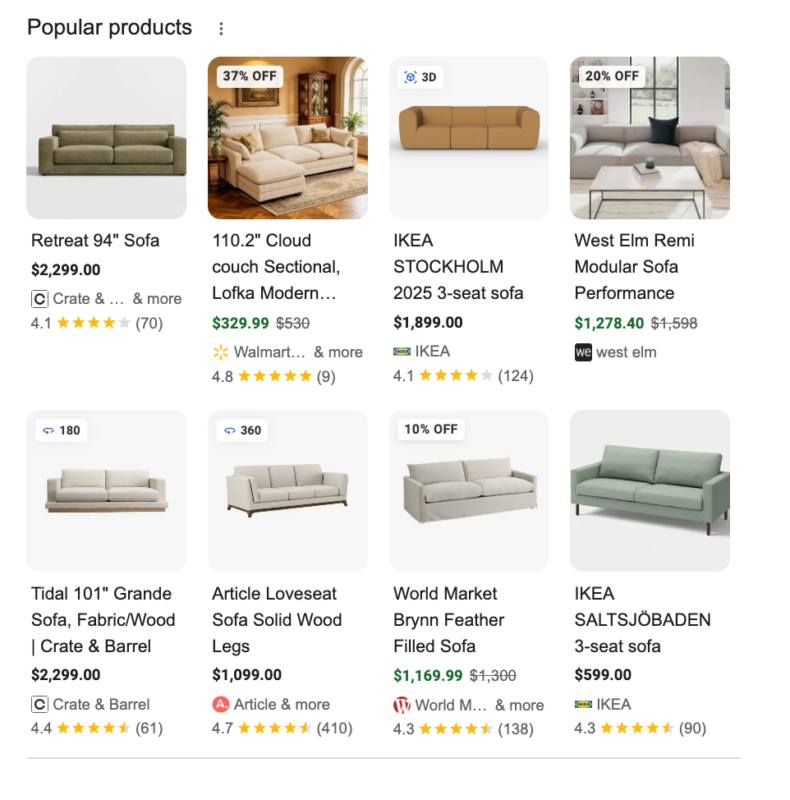
The grid format is now more common overall, typically showing 8 products shown by default, often as the first grid on the page for a given category.
The carousel shows 4 products on desktop and tends to be Google’s preferred format on mobile, where it frequently sits right at the top of the page (occasionally on desktop too), a position that can meaningfully affect CTR.
Actually, you can see the carousel mostly in the US and the UK SERPs.
Brand picks for you and style picks for you
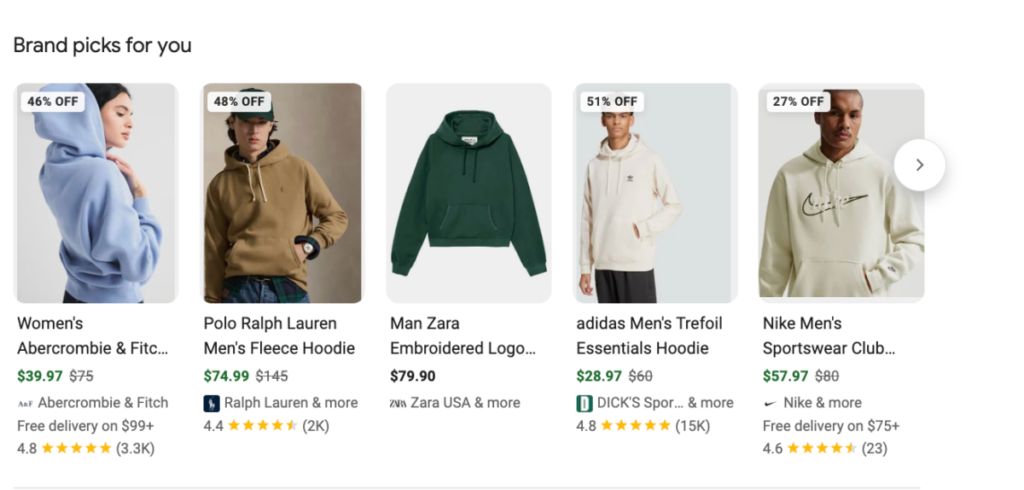
This screenshot shows two distinct personalized carousels on a Google Shopping results page for a “hoodie” search:
Brand picks for you – a carousel of hoodies from recognizable brands (Abercrombie & Fitch, Polo Ralph Lauren, Zara, adidas, Nike), each showing a discount badge, price with strikethrough original, seller name, and review rating/count.
This appears to be personalization based on the searcher’s brand affinity signals.
Style picks for you– a separate carousel below it, featuring smaller/independent or streetwear-adjacent brands (Stack Athletics, Priority Essentials, “go slow”, GBNY, MSFTSrep) rather than major retailers, suggesting Google is segmenting recommendations by aesthetic/style match rather than brand recognition.
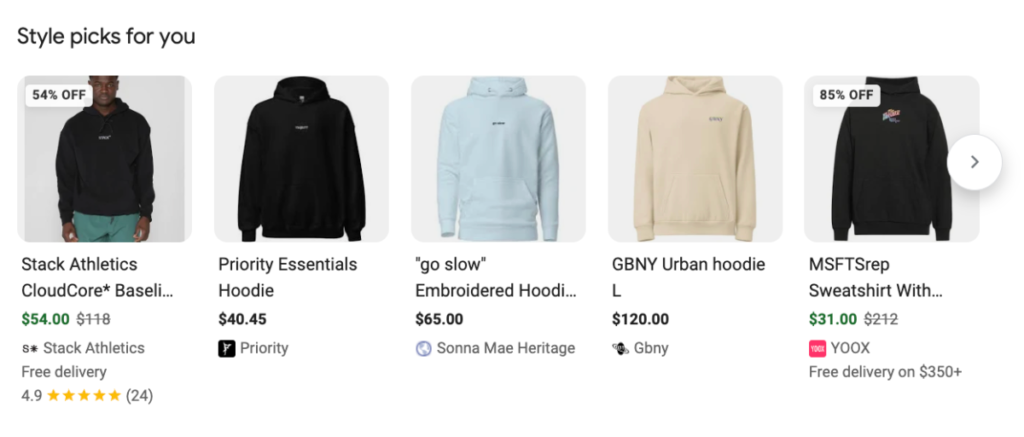
Both carousels use the same visual format (discount badge top-left, product image, name, price, seller, rating) but represent different personalization logic, one anchored to known brands, the other to style/product attributes.
Deals product grid
The deals product grid highlights products based on notable discounts rather than popularity; there’s often overlap between the two sections, since heavily discounted items also tend to be popular.
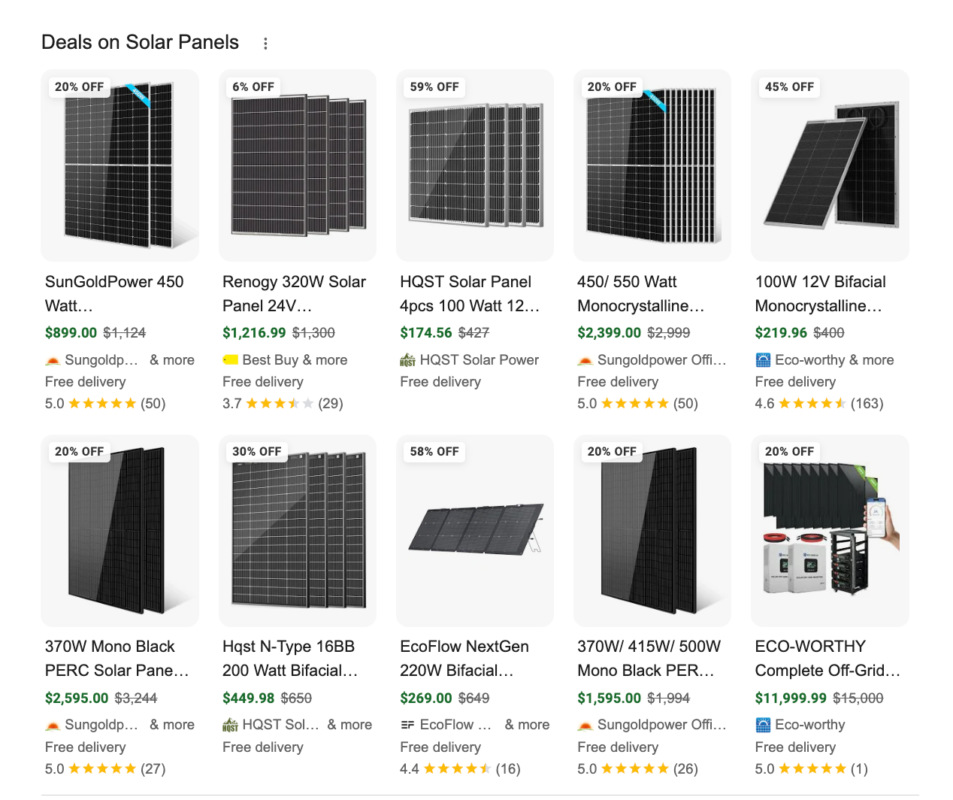
Which represents a related but separate visibility opportunity for price-competitive retailers.
In stores nearby carousel
The “In stores nearby” feature became a default part of Search toward the end of 2024 and represents a significant ranking opportunity for ecommerce stores with multiple physical locations, though it’s mostly used by larger retailers due to the complexity of setting up and managing a local inventory feed.
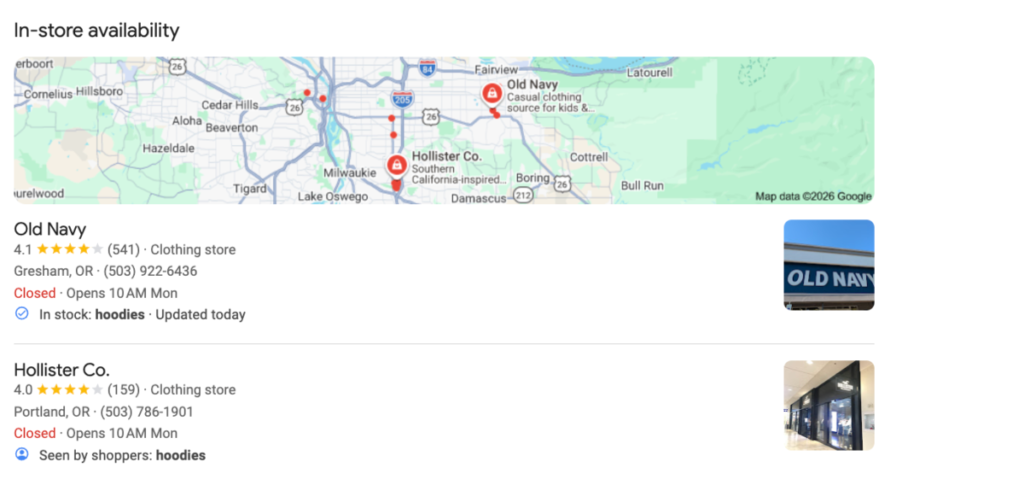
It can appear either as a carousel of products or as a map.
Getting this set up depends on separate groundwork around free local listings, which also feeds related surfaces like the “See what’s in store” (SWIS) unit on Google Business Profiles.
What you should do
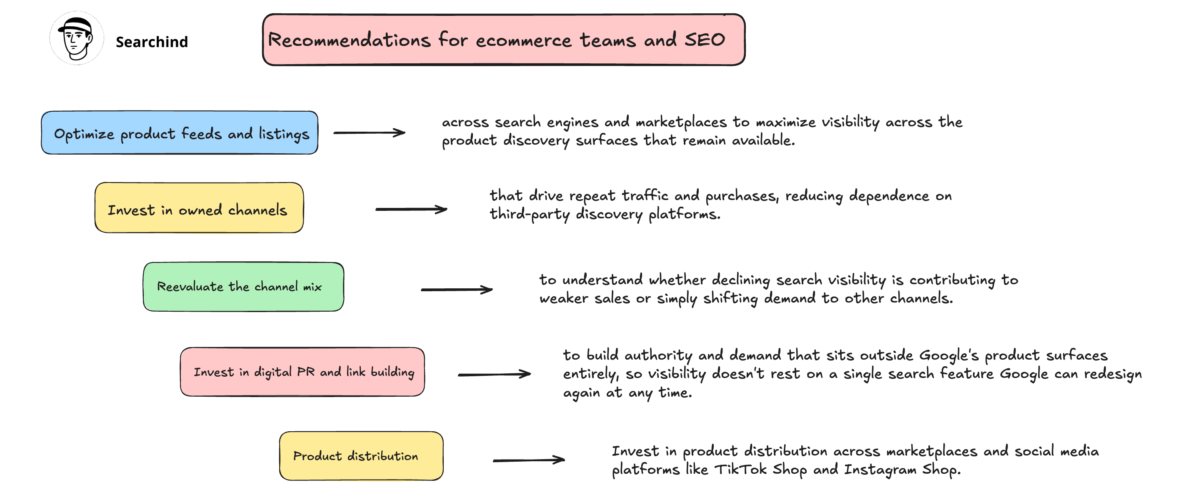
As I’ve said many times, an e-commerce business can’t depend only on Google or only on paid advertising.
In this era, we need to work across multiple channels: social media, Google, paid advertising, marketplaces, communities, and more.
If you depend only on Google, you’re putting your business at the mercy of the algorithm.
That’s why I often tell my clients and fellow practitioners to expand beyond traditional SEO.
You need to work on the entire organic growth strategy.
For example, if you have a DTC store, it’s important to work heavily on community building and organic social content. You can set up the SEO basics, and that may be enough.
But many e-commerce brands still rely almost entirely on traditional SEO because they’re working with outdated SEO freelancers or agencies that take their money without considering the bigger picture.
A real example
In the photo below, you can see a real example of what a makeup brand can do.
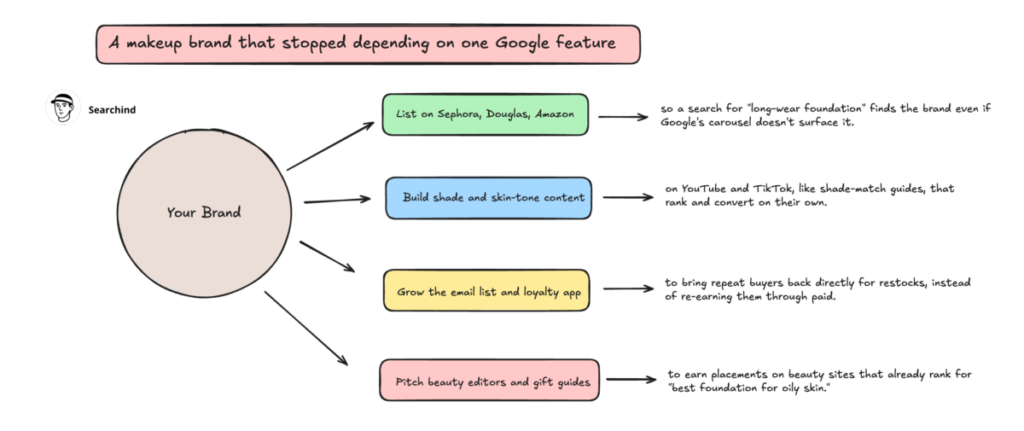
I’ll say it again: being present on the right channels is essential.
Especially for DTC brands, which can grow significantly through content and product distribution.
What I’d actually do about it right now
Don’t panic and don’t rebuild your entire strategy around a layout that’s likely to keep moving for months. But do this:
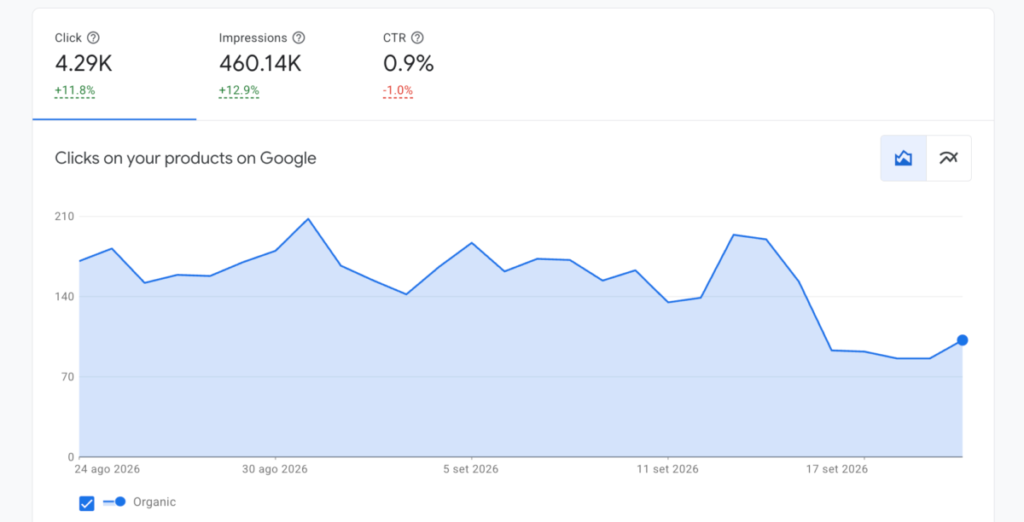
- Watch your Merchant Center organic click data over the next few weeks rather than assuming the worst from search visibility tools alone. Click-through behavior in the new layout may not degrade at the same rate the visual real estate suggests, since the aggregator unit still sends some traffic through, just with more friction.
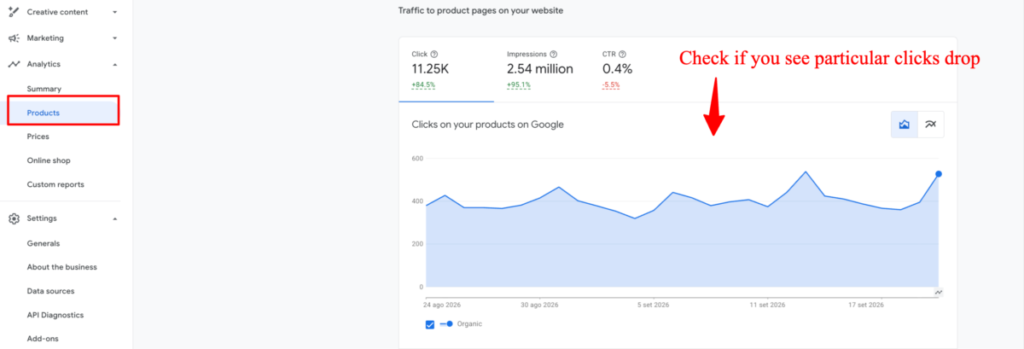
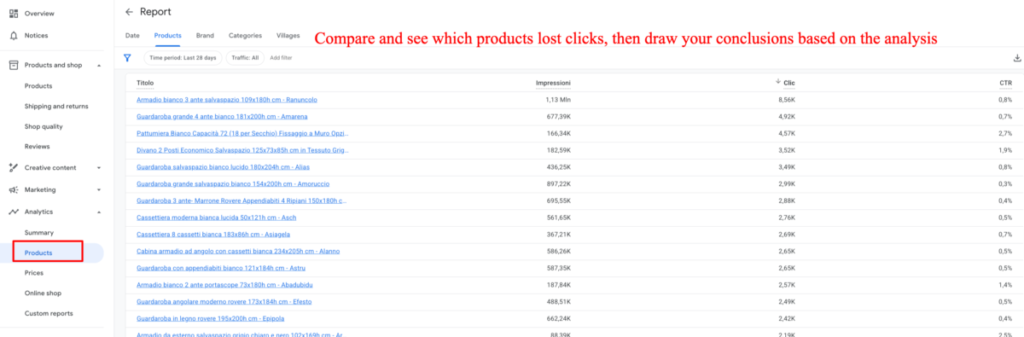
- Reassess how much of your acquisition strategy leans on generic, non-branded product queries in the EEA specifically. If that share is high, this is a good forcing function to diversify into paid, marketplace, and owned-channel demand rather than treating organic Shopping as a stable base to build on.
- Keep an eye on whether Google’s own row inside the new comparison unit becomes more or less prominent over the coming weeks. That’s the clearest signal of how much further this redesign has to move before it settles, and it’s a better leading indicator than any single week of traffic data.
This is a live situation, and the layout Google shipped on September 8 is not going to be the one we’re looking at by the end of the year.
Worth checking your own data regularly rather than assuming today’s numbers are the new normal.
Book your consultancy with me
If you’re seeing a similar drop, it may simply reflect what’s happening across the EEA right now, as I explained in this article.
If you depend heavily on Google or you want to rebuild a more resilient organic strategy, that’s exactly the kind of situation worth talking through with a consultant.
Have a similar situation? Write me here.