PIM (Product Information Management) for Ecommerce and Shopify
AI is fundamentally changing how customers discover products.
Your product data now powers Google’s AI Overviews, LLM shopping experiences, and recommendation engines, but only when it’s complete and accurate.
When product data is incomplete or inconsistent, both customers and AI systems struggle.
AI can’t understand and represent your offerings accurately without reliable information, leaving customers unable to find what they need.
This shift makes your PIM system more critical than ever.
Five years ago, product data was primarily a storefront concern.
Today, those same attributes power your website, Google Merchant Center, Meta catalogs, Pinterest, Amazon, and AI shopping systems simultaneously.
Centralized product information has evolved from a nice-to-have to an essential requirement for scaling beyond basic ecommerce.
Understanding Product Data: What It Does
Product data is no longer owned by a single team.
It’s become a shared asset across merchandising, SEO, Paid Media, CRM, and increasingly AI.
The same underlying attributes now power your website, Google Merchant Center, Meta catalogs, and every AI shopping system.
Consider what happens when a customer searches for “men’s running shoes” on Google.
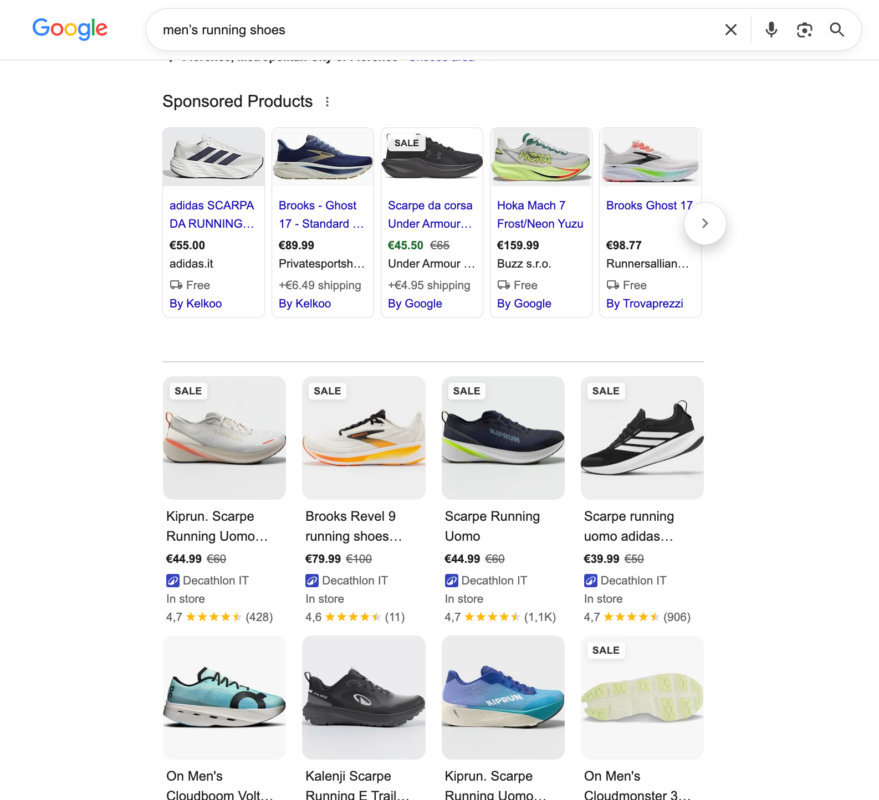
The search engine scans your product data to understand what you’re selling.
If your product titles lack key details, your descriptions miss attributes like waterproof or lightweight, or your images are missing, the search engine can’t accurately represent your products.
It shows competitors instead or displays your product with incomplete information that doesn’t match what customers actually want.
The same problem appears in AI shopping.
When an AI agent answers a customer question like “do you have waterproof running shoes in size 10?” it pulls directly from your product data.
If that data is inconsistent across channels, or if the waterproof attribute exists in one system but not another, the AI gives a vague answer or refuses to answer. The customer gets frustrated and moves to a competitor.
A PIM (Product Information Management) system addresses this problem.
Let me explain how it works.
What is a PIM?
A PIM centralizes product data from multiple sources, enriches and governs it in one place, then publishes consistent product information to ecommerce platforms like Shopify and other channels.
The flow is simple: Resources (suppliers, ERP, content teams) → Data Source (where you clean and validate everything once) → Shopify (syncs automatically) → Channels (Google, Meta, Amazon, AI systems get consistent data).
A PIM is not an e-commerce platform, it doesn’t sell anything.
It sits upstream, cleaning, enriching, and governing product information before it flows into Shopify and every other channel.
What a PIM does:
- Centralizes data: All product titles, descriptions, specs, assets, and compliance data live in one place instead of scattered across spreadsheets, Shopify, and supplier emails.
- Enriches upstream: Cleans and validates all product data once, before it reaches any downstream system. Customers see consistent product attributes across your website, Google Shopping, Meta, and Amazon.
- Enforces governance: Sets required fields, detects duplicates, requires approval workflows, and maintains audit trails. You can see who changed what and when.
- Manages scale: Handles multi-language, multi-market, multi-brand catalogs that would be unmanageable in Shopify alone. A single product can have 50 variations across 10 languages and 15 markets, all syncing correctly.
- Syncs cleanly: Routes validated, complete product data into Shopify, Google Merchant Center, Meta, Amazon, and every other channel your customers use. Each channel gets exactly what it needs, formatted correctly.
A real example: Fashion brand scaling
Imagine a fashion brand starting with 500 SKUs sold only on its website.
They use Shopify, manual Google Merchant Center updates, and occasional Meta catalog exports; everything works fine.
Two years later, they have 5,000 SKUs, sell in 8 countries, and operate in 6 languages.
Product data now comes from three suppliers, needs compliance data for different regions (sizes in EU vs US, colors that vary, care instructions in local languages), and must sync to Shopify, Google Shopping, Meta, Amazon, and their own recommendation engine.
Without a PIM, managing this complexity becomes significantly harder.
You get inconsistent product names across channels, missing attributes in some regions, inventory mismatches, and slower product launch cycles.
A PIM centralizes all that data, so your team updates a product once, and it syncs correctly to all channels and systems.
The Three-Level Maturity Model
Most ecommerce businesses don’t need everything at once.
There’s a natural progression based on scale, complexity, and spend.
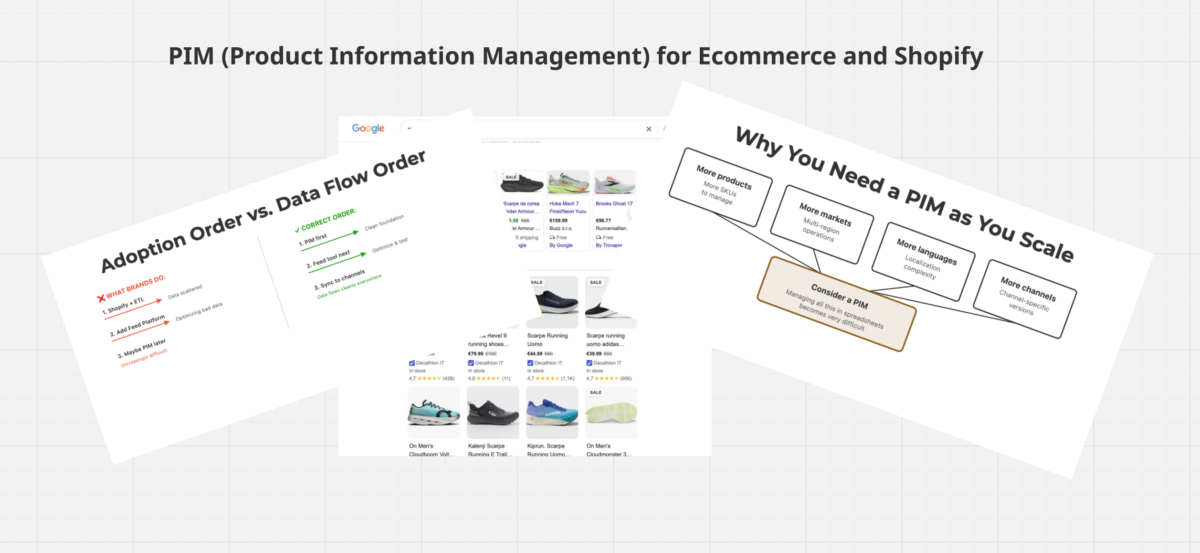
Most brands adopt levels in the wrong way, but structurally, a PIM sits upstream. For scaling, PIM is the foundational fix, even though it’s usually adopted last.
Adoption Order vs. Data Flow Order
You don’t typically start with a PIM; you begin with Shopify, add feed tools as Paid Media scales, then implement a PIM when data complexity becomes unmanageable. But you should think about it first.
Here’s how each level works and when you actually need it.
Level 1: Native Sync (Shopify to channels)
Your Shopify catalog connects natively to Google Merchant Center, Meta, Pinterest, and other channels.
You can make manual overrides directly in each platform when needed. This works well for small catalogs with straightforward products and a simple structure.
Example: You sell 200 unique products (mostly variations of 40 core items) in one country.
You manage everything in Shopify; Google Merchant Center pulls data automatically.
If a product’s availability changes in Shopify, it updates in Google within hours. You occasionally adjust a title or description in Google Merchant Center for testing. No complex workflows needed.
Level 2: Feed Management Tool
Adds rules-based testing and channel-specific optimization on top of Shopify.
You can test which Shopping titles get clicks, which labels drive ROAS, and which descriptions convert.
The feed tool creates product variations for each channel without touching your website. Great for Paid Media-heavy brands where performance testing matters.
Example: A furniture brand manages 800 products across Google Shopping and Meta, spending 8k per month on Paid Media.
Using a feed tool, they test two versions of product descriptions for one category: Version A highlights durability and materials; Version B emphasizes design and aesthetics.
Meta gets the design-focused version; Google Shopping gets the material-focused version.
After two weeks, they measure which version drives higher ROAS in each channel. The winner becomes their baseline, and they move on to test other product categories.
Level 3: PIM (Product Information Management)
Centralizes all product data upstream in one system.
You clean, enrich, and validate it once, then sync clean data downstream to Shopify, Google, Meta, Amazon, and everywhere else.
Most valuable when your data is messy, coming from multiple suppliers, or spanning many markets and languages.
Example: You have 10,000 SKUs coming from three suppliers in different countries. Each supplier sends data in different formats and with inconsistent attribute naming.
You need product data in 12 languages and must comply with regional regulations (labeling in German differs from Italian; sizes in the UK differ from the US).
A PIM becomes your central hub. You map each supplier’s data format once, set up translation workflows, and ensure compliance automatically.
When a supplier sends updated product information, the PIM validates it against your rules, enriches it with missing attributes, and syncs clean data to all channels.
Ecommerce SEO strategies that actually drive revenue for online stores
You’ll get a free weekly email with case studies, technical breakdowns, and frameworks we’ve tested across 30+ ecommerce businesses, no generic news, no thought leadership noise.
We approach SEO differently: business-focused, not traffic-focused. Every issue ties to revenue or qualified conversions.
IMPORTANT: Check your spam folder and confirm the welcome email to avoid missing future issues.
When Data Complexity Grows: The Scaling Problem
Many successful ecommerce businesses reach a point where Shopify alone struggles to manage product data effectively.
It’s not that Shopify is bad at what it does.
Shopify is designed for direct selling on your own site, not for managing product data across an entire ecosystem of suppliers, channels, and regions.
Four forces drive this complexity:
Why You Need a PIM as You Scale
When all four of these pressures hit at the same time, managing product data in Shopify becomes a bottleneck.
You need a centralized system that sits upstream, pulls data from all your sources, cleans and enriches it, and pushes clean data downstream to Shopify and every channel you use.
A PIM becomes increasingly valuable when you’re scaling across multiple data sources and regions.
It’s the infrastructure that lets your team manage growth without drowning in manual data management.
PIM vs. Feed Tool
Think of your product data like ingredients in a kitchen.
A PIM is like buying the best raw ingredients and preparing them correctly.
A feed tool is like the chef who plates each dish differently depending on the restaurant or customer they’re serving.
A PIM improves the source. You clean bad ingredients, validate quality, remove duplicates, and store everything in consistent formats. With strong source data, distributing to multiple channels becomes significantly easier.
A feed tool improves distribution. You take good ingredients, assuming they’re already good, and create variations for different channels. You test which presentation sells better on Google versus Meta. You adjust descriptions for mobile versus desktop. You optimize for different audience segments.
A feed tool can’t fix bad data; it can only optimize what’s already there.
If your product titles are missing key attributes or your descriptions are inconsistent, a feed tool will amplify those problems across every channel.
Strong source data through a PIM typically needs to come before performance optimization through a feed tool.
| PIM: IMPROVE THE SOURCE | FEED TOOL: IMPROVE DISTRIBUTION |
|---|---|
| Clean data once | Create variations |
| Validate completeness | Test titles & labels |
| Enrich attributes | Channel-specific rules |
| Centralized data | Measure performance |
| Sync everywhere | Validate requirements |
Brands with both systems typically perform better: A PIM ensures the data is complete and accurate. A Feed tool ensures that data reaches customers in the most effective way.
When Shopify alone is enough
When Shopify Alone Is Enough
✓ Shopify works when:
- Small to moderate catalogs (hundreds to low thousands of SKUs)
- One storefront plus a few connected sales channels
- Straightforward product types
- Simple localization (one or two markets)
- Teams update products directly in Shopify
✗ Shopify struggles when:
- Data flows from multiple suppliers and systems
- Complex attribute models beyond metafields
- Multi-market, multi-language, multi-brand
- You need formal approval workflows and audits
- Managing 5,000+ SKUs across regions
Your Implementation Roadmap
Scenario 1: Starting from scratch
Use Shopify’s native tools fully.
Structure your metafields properly, build your product taxonomy, and establish high data quality standards from day one.
Don’t over-engineer at this stage. You’ll know it’s time for a PIM when you hit the scaling wall: multiple suppliers, localization complexity, or approval workflows breaking down.
Example: A D2C apparel brand launches with 100 products.
They set up Shopify with clear naming conventions, detailed descriptions, and complete images.
One person manages inventory and product data, so quality stays consistent.
They manually export to Google Merchant Center monthly.
As they grow to 500 products and hire new team members, Shopify still handles the job well; a clean structure prevents chaos.
Scenario 2: Heavy paid media testing
Implement a feed management tool (Channable, Feedonomics, Athos Commerce) to test which Shopping titles, descriptions, and labels drive ROAS. This is pure performance optimization layered on top of clean data.
Example: A fashion brand spends a significant budget on Google Shopping across 1,500 SKUs.
They use a feed tool to create 3 title variations per product and test them in separate campaigns: one emphasizing style, one emphasizing price, one emphasizing materials.
After 4 weeks, the price-focused variant wins (lowest CPA). They lock it in and repeat this test monthly on different product groups, continuously improving performance.
Scenario 3: Scaling across regions
Implement a PIM (Plytix, Akeneo, Salsify, InRiver) to centralize multi-language, multi-market data.
Clean once at the source, then sync consistent data to Shopify and all channels.
Only after your foundation is solid should you layer in a feed tool for performance testing.
Example: A European furniture brand sells in Italy, France, Germany, and Spain.
Each market has different size standards, tax requirements, and naming conventions.
Product data arrives from 2 suppliers in different spreadsheet formats.
A PIM centralizes everything: maps supplier formats to standard fields, sets up translation workflows, and ensures tax data is correct per region.
Once the data foundation is clean and localized, they sync to Shopify and begin performance testing.
Scenario 4: Enterprise scale with multiple channels
You need both systems.
A PIM manages data governance and enrichment upstream.
A feed tool optimizes performance for each channel downstream.
This full stack compounds ROI through higher ROAS, lower CAC, and faster scaling.
Example: A large ecommerce beauty brand manages 8,000 SKUs across 12 countries with significant paid media spend.
Their PIM (Salsify) consolidates product data from 3 suppliers, enforces regional compliance, and manages translations.
A feed tool (Channable) optimizes clean data for Google Shopping, Meta, Pinterest, and their website.
The feed tool tests different product groupings and creative approaches per channel. The PIM keeps everything up to date and compliant. Together, they drive continuous performance improvement.
Platforms/Tools
PIMs
Plytix – Entry‑level PIM for teams new to centralized product data. Quick to implement, built for speed and simplicity.
- Best for: Small teams running ~500–3,000 SKUs across 1–2 markets, with straightforward data models and limited channel complexity.
- Limitations: Can become a bottleneck as you add markets, channels, or complex workflows; it still technically supports far more SKUs, but operational complexity often outgrows the tool before SKU count does.
Salsify, Akeneo, inRiver, Pimcore – Enterprise PIMs built for complexity and scale. Handle multiple languages, regulatory requirements, supplier onboarding, real‑time syncs to many channels, and advanced workflow/compliance controls.
- Best for: Brands and retailers with 5,000+ SKUs, multiple brands/markets, and teams that need strict permissions so people don’t overwrite each other’s work.
- Typical use cases: Automated supplier data ingestion, multi‑market content workflows, syndication to 5+ channels (marketplaces, retailers, ad platforms, etc.), and governance around who can publish what.
Emfas – Emerging AI‑native PIM. Positions AI enrichment as the default workflow, not an add‑on.
- Best for: Teams that want AI generating, cleaning, and enriching product data as part of the core system (e.g., auto‑writing titles/descriptions, normalizing attributes, filling gaps from supplier data).
- Differentiator: AI is built into the data model and workflows from day one, rather than bolted on later via plugins or custom scripts.
| Platform | Best For | Typical SKU Range | Markets / Channels | Key Strengths | When It Becomes a Bottleneck |
|---|---|---|---|---|---|
| Plytix | Small teams new to PIM; fast setup, simple data models; strong fit for D2C/Shopify brands | ~500-10,000 SKUs in typical use; can technically go higher, but operational complexity often outgrows the tool before SKU count does | 1-2 markets, limited channels | Speed of implementation, spreadsheet-like UI, low cost, good for teams moving off spreadsheets | Complex workflows, many markets/channels, advanced governance, heavy syndication needs |
| Salsify | Enterprise brands/retailers with heavy syndication to marketplaces and large retailers | 5,000-100,000+ SKUs (often 10K-500K in real deployments) | Multiple markets, 5+ channels (marketplaces, retailers, ads) | Syndication at scale, supplier onboarding, compliance workflows, retail-ready integrations (Amazon, Walmart, etc.) | Cost/complexity for very small teams; overkill for simple, single-market setups |
| Akeneo | Mid-to-enterprise brands needing flexible, dev-friendly PIM with strong ecosystem | 5,000-100,000+ SKUs (often cited for 50K-500K) | Multi-market, multi-channel, B2B/B2C | Open-source option, strong data modeling, large connector ecosystem, good balance of power and usability | Requires more technical resources for advanced customizations; can be heavy for very small teams |
| inRiver | Enterprise B2B/B2C with complex workflows, compliance, and regulated-industry needs | 5,000-100,000+ SKUs | Multi-market, multi-channel, heavy workflow needs | Workflow/compliance controls, strong for regulated industries, enterprise governance | Higher cost/complexity; less ideal for very small catalogs or teams without dedicated PIM owners |
| Pimcore | Tech-heavy teams wanting PIM+DAM+CMS in one highly customizable platform | 5,000-100,000+ SKUs | Multi-market, multi-channel, complex data | All-in-one platform (PIM+DAM+CMS), highly customizable, strong for dev-heavy organizations | Heavy implementation effort; needs in-house/dev resources; can be over-engineered for simple use cases |
| Emfas | Teams that want AI-native product data workflows; fast-moving D2C brands on Shopify/Centra | ~1,000-50,000+ SKUs; AI enrichment scales well with catalog size | Multi-market, multi-channel, AI-driven enrichment | AI enrichment as default (titles, attributes, gap-filling, brand-voice rewriting), fast iteration, built for modern AI shopping agents | Newer vendor; less mature ecosystem and third-party integrations than legacy PIMs |
Feed Management Platforms
Channable – Starting point for feed testing and optimization. Creates channel‑specific variations of titles, descriptions, labels, and other attributes; includes basic A/B testing of feed rules and content.
- Best for: ~500–2,000 SKUs, brands testing or scaling Google Shopping and other paid channels without heavy engineering support.
- Typical use cases: Rapid iteration on title structures, category mapping, and label strategies; multi‑channel distribution (Google, Meta, marketplaces) with rule‑based transformations.
DataFeedWatch – Mature, mid‑market feed optimizer with deep Google Shopping/Merchant Center focus and very broad channel coverage (2,000+ channels). Strong rules engine, A/B testing, and AI‑assisted title/description generation.
- Best for: ~1,000–30,000 SKUs, SMB to mid‑market brands and agencies that want serious control over feed logic without enterprise pricing.
- Typical use cases: Google Shopping feed optimization (titles, categories, custom labels), multi‑country/multi‑account setups, agency dashboards managing many client feeds.
- Positioning vs others: Often shortlisted against Channable; tends to win on Google Shopping depth and documentation, while Channable is sometimes preferred for broader marketplace automation.
Feedonomics – Advanced feed platform for higher volumes and performance‑driven optimization. Offers sophisticated rule engines, workflow automation, and integrations that enable performance‑based adjustments.
- Best for: ~3,000–10,000+ SKUs, brands with significant Paid Media spend that want feeds to react to ROAS/revenue signals (often with additional data/automation layers).
- Typical use cases: SKU‑level feed strategies tied to performance data, automated pausing/boosting of under/over‑performing products, complex multi‑account, multi‑country feed setups.
Athos Commerce – Feed platform focused on catalogue complexity. Designed to handle deep variant structures, bundles, dynamic pricing, and hierarchical product relationships with intelligent feed logic.
- Best for: Structurally complex product catalogues that need more than flat, one‑to‑one product → feed item mappings.
- Typical use cases: Advanced experimentation on feed attributes, AI‑assisted feed audits and fixes, and feeds that reflect complex onsite catalog logic (bundles, pricing rules, nested variants).
| Platform | Best For | Typical SKU Range | Paid Media Profile | Key Strengths | When to Consider Something Else |
|---|---|---|---|---|---|
| Channable | SMB/mid-market brands testing and scaling feeds without heavy engineering; strong for Google Shopping + marketplaces | ~500-5,000+ SKUs; used both below and above this range | Moderate spend, growing Shopping/Meta; teams that want to test and iterate quickly | Easy rule engine, A/B testing, broad channel coverage, quick setup, good documentation | Very complex catalogs, enterprise-level performance automation, or the need for deep custom logic |
| DataFeedWatch | Mid-market brands/agencies with strong Google Shopping focus; multi-country, multi-account setups | ~1,000-30,000 SKUs (Shop: 1K, Merchant: 5K, Agency: 30K+ tiers) | Moderate to heavy Shopping spend; agencies managing many client feeds | Deep Merchant Center features, 2,000+ channels, AI-assisted content, agency-friendly pricing and dashboards | Need for ultra-advanced ROAS-driven automation, managed services, or extremely large enterprise catalogs |
| Feedonomics | Brands with significant Paid Media spend wanting performance-driven feeds; enterprise Shopping/PMax setups | ~3,000-100,000+ SKUs (scales much higher in enterprise) | Heavy spend, multi-account, multi-country; teams using advanced bidding/segmentation | Sophisticated rules, performance-based adjustments, strong support/consulting, robust automation | Small budgets or very simple feeds; may be overkill for basic Shopping setups |
| Athos Commerce | Structurally complex catalogs (bundles, variants, dynamic pricing); AI-assisted feed audits and experimentation | ~5,000+ SKUs (complexity-focused rather than pure volume) | Mid to heavy spend, complex logic needs; teams running advanced feed experiments | Handles deep variant/bundle logic, AI feed audits, experimentation module, intelligent feed transformations | Simple flat catalogs; less brand recognition and third-party validation than Channable/Feedonomics/DataFeedWatch |
Create your own PIM system
You don’t need to buy enterprise software to start centralizing and enriching your product data.
Many successful ecommerce brands build a DIY PIM using tools they already have or can access easily.
You can build this yourself.
What does a DIY PIM need?
Three components:
- A centralized data hub – One place where all your product information lives
- An enrichment layer – Where you clean, validate, and approve changes
- Sync automation – That pushes clean data to Shopify, Google, Meta, and other channels
How to Build It?
- Start with what you have. Most teams already own spreadsheet tools, automation platforms, or database systems. The key is to make them work together as a system rather than as separate tools.
- Structure your data first. Before choosing a tool, decide: What product fields do you need? (title, description, attributes, images, compliance data, SEO metadata?) What do suppliers send you? What does each downstream channel require? Map this out; it’s independent of the tool.
- Connect the pieces. Find or build automation that pulls data from suppliers → feeds it into your hub → validates it → syncs clean data to Shopify and channels. Most automation platforms have pre-built connectors for common systems.
- Add quality gates. Implement checks that flag incomplete or inconsistent data before it syncs. Products with missing descriptions, broken image URLs, or incomplete attributes shouldn’t reach customers. Automation can catch these automatically.
- Create an approval workflow. Products shouldn’t sync immediately. Build a simple workflow: Draft → Review → Approved → Sync. This prevents errors and creates an audit trail.
If you need help building your DIY PIM system, mapping your data structure, setting up automation, or designing your approval workflow, I can help you create it. Contact me.
The bottom line
Product data it’s a continuous operating discipline.
As AI increasingly intermediates how shoppers discover products, the quality of your product data has shifted from an operational concern to a competitive advantage.
Where you are now depends on your catalog size, geographic reach, and Paid Media investment.
Three practical next steps:
- Audit your current product data. How many missing attributes? How many inconsistent titles across channels? What’s your current cost per missing attribute in lost AI?
- Map your growth plan. Where will you be in 12 months? More products? More markets? More channels? That planning exercise will tell you exactly which tools you need.
- Build a business case. Calculate the cost of bad product data today (lost impressions, low AI selection rates, support tickets from confused customers). Compare that to the cost of a PIM or feed tool. The ROI becomes obvious when you measure it.
Many successful ecommerce brands treat product data as a core operational asset.
They invest in the infrastructure, they measure the return, they iterate, and you can do the same.
My services
My services are highly personalised to each client.
Some services I offer: